How to convert text to lowercase
- Paste or type your text into the box on the left. You can also drag a
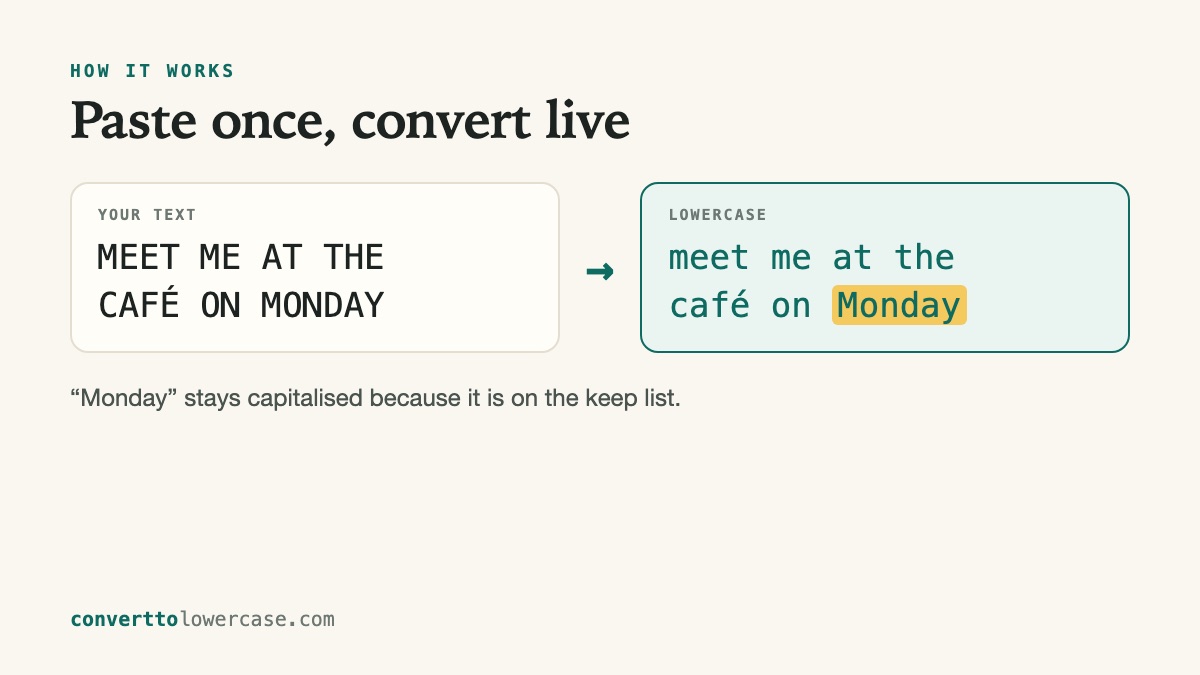
.txt,.csvor.mdfile onto it. - Read the result on the right. The converter starts in lowercase mode, so every capital letter is already a small letter. There is no button to press.
- Fine-tune if you need to. Open Options to keep links and e-mail addresses untouched, protect names such as London or iPhone, or apply Turkish rules for the letter I.
- Copy or download. Press Copy to put the result on your clipboard, or Download to save it as a text file.
Working through several steps? Reuse moves the result back into the input box, so you can, for example, lowercase a list and then remove its extra spaces.
What makes this lowercase converter different
Live, side by side
The original stays on the left and the converted text on the right, so you can compare both before you copy anything.
Protect words you choose
Add brand names, people or acronyms to the keep list and they keep their exact capitalisation in every mode.
Links stay working
Web addresses can be case-sensitive after the domain name. The URL option leaves links and e-mail addresses exactly as you typed them.
Language-aware
Turkish and Azerbaijani have a dotted and a dotless i. Pick the language and “I” becomes “ı” while “İ” becomes “i”.
Counts what changed
See characters, words and lines, plus how many letters were actually changed by the conversion.
Private by design
All conversion runs in your browser. Your text is never sent to a server, logged or stored.
Lowercase compared with other text cases
“Lowercase” means every letter is written in its small form. It is one of several ways to capitalise text, and each has its own job:
| Case | Example | Typical use |
|---|---|---|
| lowercase | meet me at the café on monday | Usernames, tags, e-mail addresses, URLs, data cleaning |
| UPPERCASE | MEET ME AT THE CAFÉ ON MONDAY | Short labels, acronyms, warnings — see convert to uppercase |
| Sentence case | Meet me at the café on Monday | Normal sentences, UI text, subject lines — see sentence case |
| Title Case | Meet Me at the Café on Monday | Headlines, book and article titles — see title case |
| Capitalize Words | Meet Me At The Café On Monday | Names, product listings, addresses |
Notice that lowercase turns Monday into monday. A converter cannot know which words are proper nouns, which is why the keep list exists: add Monday to it and it stays capitalised.
When converting to lowercase is useful
- Fixing Caps Lock accidents. A paragraph typed in capitals can be lowercased in one go, then switched to sentence case to restore normal capitals. Our uppercase to lowercase page covers this in detail.
- Cleaning lists before comparing them. “Anna@Example.com” and “anna@example.com” reach the same inbox at almost every mail provider, but a spreadsheet treats them as different values. Lowercase both lists before removing duplicates.
- Hashtags, usernames and slugs. Many platforms show or store these in lowercase, and consistent casing makes them easier to read and search.
- Code and configuration. HTML attributes, CSS class names, file names on Linux servers and many configuration keys are conventionally lowercase. See how to lowercase strings in programming languages.
- Consistent data entry. Product codes, city names or tags typed by many different people are easier to group once they share one case.
Changing case in other apps
Most office apps can change case too, but each one does it differently. These guides show the exact menu, shortcut or formula:
| App | Fastest way to lowercase | Guide |
|---|---|---|
| Microsoft Excel | =LOWER(A2), then paste as values | Excel guide |
| Microsoft Word | Select text, press Shift + F3 | Word guide |
| Google Docs | Format → Text → Capitalization → lowercase | Docs & Sheets guide |
| Google Sheets | =LOWER(A2) | Docs & Sheets guide |
| Python, JavaScript, SQL… | .lower(), .toLowerCase(), LOWER() | Programming guide |
Good to know about lowercase letters
- Only letters change. Numbers, punctuation, symbols and emoji stay exactly as they are.
- Scripts without case are left alone. Chinese, Japanese, Arabic, Hebrew and Hindi have no capital letters, so they pass through unchanged. Latin, Greek, Cyrillic and Armenian letters are converted.
- Greek final sigma is handled. “ΟΔΟΣ” becomes “οδος” with the final form ς at the end of the word, as Greek spelling requires.
- German ß is already lowercase. It stays “ß”. Going the other way, uppercase turns it into “SS”.
- Turkish I needs the language option. Without it, “I” becomes the dotted “i”, which is right for English but wrong in Turkish words such as “ISPARTA”.
Frequently asked questions
How do I convert uppercase text to lowercase?
Paste the text into the left box. The converter is in lowercase mode by default, so the right box immediately shows every capital letter as a small letter. Press Copy to use the result.
Do I need to press a convert button?
No. The result updates live while you type or paste, and whenever you pick a different case.
Is my text saved or uploaded?
No. The conversion runs entirely in your browser. Only your option settings (such as the keep list) are remembered in your browser so they are ready next time; the text itself is never stored.
Can I keep some words capitalised?
Yes. Open Options and type the words into “Always keep these words exactly as written”, separated by commas or new lines. They keep that exact spelling in every case mode.
Will links in my text still work?
Turn on “Keep links and e-mail addresses unchanged”. Domain names are not case-sensitive, but the part of a URL after the domain can be, so lowercasing a link may break it.
Is there a size limit?
There is no fixed limit. Very long texts of several megabytes still work; the update just waits a moment after you stop typing.
Does it work on phones?
Yes. On small screens the two boxes stack vertically, and Copy uses your phone’s clipboard.